Start free Log in
English
Distance contract Refund policy Terms of use Cookie policy Privacy policy
Back

For selling tutoring

Sell and run your tutoring in one place

Set when you are free, create lesson packages or support programmes, send a payment link. After payment, all client work happens in one dashboard.

  • Two clear options: lesson packages or support programmes
  • Open hours and booking in your calendar
  • Payments: Stripe or PayPal
  • A plan, materials and progress for each client

14 days free. No bank card needed.

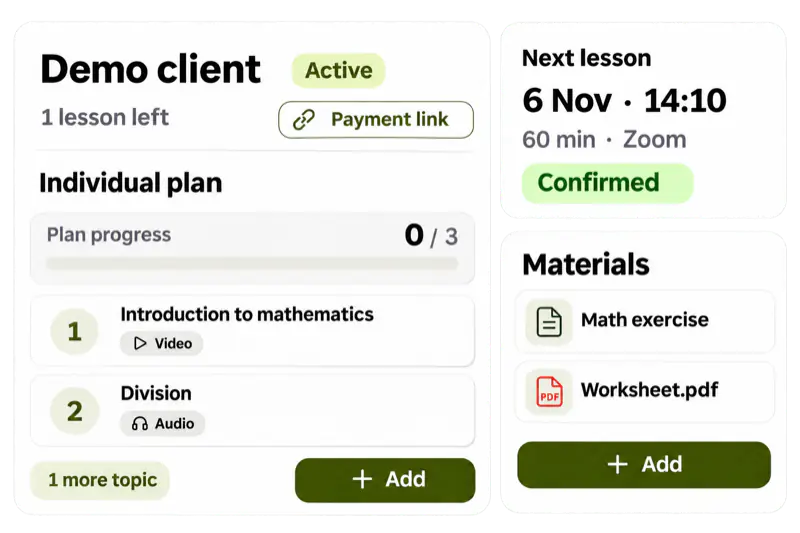
Client card in SelfGrow: active client, individual learning plan with progress, upcoming lesson on Zoom and client materials
  • Packages and weeks Sell a set number of lessons or support for N weeks
  • Schedule Open hours, booking, Zoom or Teams
  • Client card Plan, materials, progress and notes
  • Your school address yourschool.selfgrow.me or your own domain

What you sell

Two clear options — pick what fits how you work

Many tutors still count lessons in spreadsheets and book clients in chat. SelfGrow replaces that with one of two formats — clients always know what they are buying.

Number of lessons

Lesson packages

The client buys, for example, 5 or 10 lessons. They book a time in your calendar; remaining lessons decrease after each meeting.

When this fits better
  • What matters is lesson count, not a time period
  • Languages, exam prep, music, school subjects
  • The client chooses when to come
What the platform replaces
  • A spreadsheet of “lessons left”
  • Manual “you can start now” after a bank transfer
  • Bookings lost in chat threads

After payment: remaining lessons and booking from your open hours.

How to get to the first sale

Time period

Support programmes

The client buys, for example, 4 or 8 weeks of support. During that time they see tasks, materials, progress and consultations when needed.

When this fits better
  • Work continues between lessons
  • Plan, materials and progress matter most
  • You want a clear end date, not only a lesson count
What the platform replaces
  • Sending PDFs and tasks by email
  • Notes on “who is in which week” in different places
  • A separate page just for materials

After payment: access until the end date and all work on the client card.

What you see and what the client sees

What is included

Everything you need to sell and run tutoring

From offer to client card — without spreadsheets and separate booking forms.

Individual plans per client

Sell lesson packages or support programmes. Each client has a clear status: awaiting payment, active or ended.

Two options

Lesson library and assignment

Organise shared content and assign it to a specific client — others do not see someone else’s plan.

File library

Schedule when you are free

Set weekly open hours, sync with Google Calendar and connect Zoom, Google Meet or Microsoft Teams.

Google Calendar

School page with your offer

Publish a tutoring programme with price and description. Your school already has an address — share the link by email or social media.

School page

Payments your clients already use

Connect Stripe, PayPal or bank transfer. Access opens automatically after payment.

Payment settings

Progress and materials in one place

See where the client is, add personal materials and notes — all on the client card.

Working with students

Start with one offer and test the payment link.

Try for free
Three steps: a 4-lesson package for €20, a payment link for the client, work in the client card with plan progress

How it works

Three steps from setup to your first client

No coding. What you need is a clear offer and a payment link.

  1. Prepare the programme

    Set the format, lesson length, open hours and create at least one offer — a package or a support programme.

  2. Send the payment link

    Choose a client or create a link without assigning one. The client sees the programme on your school site and pays.

  3. Run the work on the client card

    After payment, remaining lessons or an access end date open. You assign tasks, materials and follow progress.

Next: create your first offer.

Start with tutoring
Weekly availability in SelfGrow: open times by day, lesson duration and break, Google Calendar connection and a confirmed lesson

When you are free

Manage your own schedule

Clients book only your open hours. Busy times from Google Calendar close automatically.

  1. Weekly open hours

    Set recurring open hours and buffers between lessons.

  2. Calendar sync

    Connect the school Google Calendar so you do not clash with other meetings.

  3. Video links

    Zoom, Google Meet or Microsoft Teams — the link is attached to the booking.

More about connecting the calendar.

Google Calendar feature

Content for the client

Library, individual plan and materials

Shared content stays in the programme. Each client only gets what you assign to them.

Lesson library

Save topics and files once, then assign them to a client.

File library

Individual study plan

Take shared content onto the client card and adapt it — other clients are unaffected.

Extra materials for the client

PDFs, links and files right on the client card — between lessons.

Working with students

Start with one topic in the library.

Try for free
Offer 5 lessons 60 min

English private lessons

Format
1:1
Video
Zoom
Access
After payment
€120

Sales page

Publish your tutoring programme on your school site

Description, price and payment — without a separate website. Your school gets an address straight away.

About the school page

Client journey

  1. Opens the programme page with your offer.
  2. Pays with a method you connected.
  3. When payment is confirmed, remaining lessons or an access end date open.
  4. Gets an email and enters the client portal — books a time or sees tasks.

If payment fails, access stays closed. Walk this path yourself before you publish.

Payments and access

What happens when the client taps “Pay”

You do not grant access by hand. Connect a payment method — access opens after a confirmed payment.

  • Stripe
  • PayPal

After payment, money goes straight to you. SelfGrow takes a platform fee only on some plans and only on card payments via Stripe.

All integrations

Working with the client

What you see and what the client sees

Your dashboard

Client card

  • Status: awaiting payment, active or ended
  • Remaining lessons or access end date
  • Tasks, materials and progress
  • Private notes only for you
Client card in SelfGrow: Active status, topic progress 33%, tasks and materials, a private note only for the tutor

Pricing

What it costs to host tutoring

You pay a subscription and, if the plan includes it, a platform fee on sales. Payment provider fees are separate.

  • Card · PayPal · EveryPay · Montonio · MakeCommerce · Bank transfer
  • VAT included
  • 14 days free, no card

Starter pack

For your first paid course, when you run the school on your own.

9 .00 € / per month

Courses
5
Students
30
Storage
20 GB

7,5% on card payments via Stripe

30-day trial on this plan

Payments

Card · Montonio · Bank transfer

  • School page
  • Quiz System
  • Certificate Generation
Choose plan

Full Pack

For a large school or training centre with a wide course catalogue.

98 .00 € / per month

Courses
100
Students
1 000
Storage
100 GB

0% platform fee

30-day trial on this plan

Payments

Card · PayPal · EveryPay · Montonio · MakeCommerce · Bank transfer

  • School page
  • Quiz System
  • Certificate Generation
  • Private courses
Choose plan
Try 14 days free Create a tutoring programme, one offer and walk the client path before you pick a plan. No card needed.

Estimate for your volume

To platform = monthly subscription + plan percentage if every sale is paid by card via Stripe. Bank transfer or PayPal carry no percentage.

Starter pack – –
Extended pack – –
Full Pack – –

Alternatives

Why not only Zoom and Excel?

Every path works. The difference is how much manual work remains after each lesson.

  • Zoom + Google Calendar + Excel Fast to start, but you manage payment, remaining lessons and materials by hand. Easy to miscount what is left.
  • Social media only Posts and DMs work, but there is no clear sales page, automatic access or client history.
  • Generic booking tool Booking exists, but not learning materials, progress and school branding in one place.

Common questions

Before you start selling tutoring

Did not find an answer about your tutoring?

Tell us how you work with clients and what you want to sell. We will reply for your case.

Write to us
How is tutoring different from a course?

In tutoring the client books time in your calendar and works with you one-to-one — via packages or a support programme. A course is modules and video the student goes through at their own pace.

Can I sell both packages and support programmes?

Yes. One programme can offer both. Each purchase is a single offer.

How does the client get access after payment?

Automatically. A package opens remaining lessons; a support programme opens access until the end date. The client gets an email and enters the client portal.

Can I assign materials to only one client?

Yes. Shared content lives in the library; on the client card you assign an individual plan and extra files.

Do I need a separate website?

No. You publish the programme on your school site, for example yourschool.selfgrow.me. You can add your own domain later.

Which payments can I connect?

Stripe, PayPal and bank transfer. You turn them on in payment settings.

What is the no-card trial?

You can try SelfGrow without a bank card. Some paid plans also have their own trial — you see it before activation.

Get started

Try SelfGrow with your tutoring

Create one offer and test the payment link before you share it with a client.

  • 14 days free
  • No card needed
  • Plan prices include VAT

During the trial

  1. Create a programme Set the format, open hours and first offer.
  2. Run a test payment Walk the path the way a client will.
  3. Open the client view Check booking, materials and status.